- 1. Introduction
- 2. What Is DeepSeek?
- 3. What Is ChatGPT?
- 4. DeepSeek vs ChatGPT: Key Differences at a Glance
- 5. Test #1: Build Me a 3D Solar System (The Most Revealing Test)
- 6. How I Tested Both AI Tools
- 7. Writing Quality Comparison
- 8. Coding Ability Comparison
- 9. Research & Reasoning
- 10. Speed & Response Time
- 11. Pricing: Which Is Cheaper?
- 12. Who Should Use DeepSeek?
- 13. Who Should Stick With ChatGPT?
- 14. Frequently Asked Questions
1. Introduction
If you’ve been online in 2026, you’ve probably heard two names over and over: ChatGPT and DeepSeek. One is the veteran — the AI that started it all. The other is the scrappy newcomer from China that shocked the entire tech world when it launched in early 2025.
But which one is actually better for you?I spent months testing both tools — not just with simple questions, but with real challenges. I asked them to write essays, fix code, respond to emotional situations, and even build a fully interactive 3D Solar System animation from scratch. The results were surprising, sometimes shocking, and always revealing.
2. What Is DeepSeek?
DeepSeek is an AI model and chatbot developed by a Chinese AI lab of the same name. It exploded onto the scene in January 2025 when its R1 reasoning model went viral — not just for being powerful, but for being shockingly cheap to build. While OpenAI spent an estimated $100 million+ training its models, DeepSeek’s was built for roughly $5.5 million.
What really set DeepSeek apart was its Mixture-of-Experts (MoE) architecture. Instead of using all of its 671 billion parameters on every request, it activates only about 37 billion per query — making it dramatically more efficient. This efficiency allows DeepSeek to offer everything completely free, with no subscription required.
DeepSeek Key Features
• In-chat execution — builds and runs code, apps, and animations directly inside the chat
• Deep Think mode — ‘thinks out loud’ before answering, showing its reasoning step by step
• Open source — anyone can download, run, and customize the models
• Strong math and coding — outperforms many models on technical benchmarks
• Completely free — no paid plans, no usage limits in testing
• Web search — can search the internet for current information
• API access — extremely cheap for developers (up to 96% cheaper than ChatGPT)
DeepSeek Pros and Cons
| Pros | Cons |
| 100% free — no subscription needed | Data stored on servers in China |
| Executes results directly inside the chat | No image understanding or generation |
| Excellent for math, logic, and coding tasks | No voice mode |
| Open source — full transparency | Censorship on politically sensitive topics |
| Deep Think mode shows detailed reasoning | Fewer features than ChatGPT overall |
| API is dramatically cheaper for developers | Interface feels basic compared to ChatGPT |
| Strong benchmark scores in STEM tasks | No memory or custom assistant features |
3. What Is ChatGPT?
ChatGPT is an AI chatbot that was launched in November 2022. It was created by the company OpenAI. A chatbot means you can talk to a computer the same way you talk to humans. This tool became extremely popular around the world because it can complete tasks that usually take hours in a much shorter time.
By the beginning of 2026, more than 400 million people use ChatGPT every week. ChatGPT runs on a technology called GPT.
It has different versions:
- GPT-3
- GPT-4
- GPT-5 (this is the latest and most powerful version as of 2026)
ChatGPT is not just a simple tool. You can use it to do many tasks that used to take hours to complete.
You can use it for:
- Research
- Coding
- Creating images
- Writing
- Helping with marketing
- Helping with SEO
- Helping grow your social media accounts
It can understand different types of things such as:
- Text (what you write)
- Images
- Voice or audio
As people started liking it more, many new features were added to ChatGPT:
- Memory — it can remember your preferences
- Custom GPTs — you can create your own specialized AI
- Voice mode — you can talk to it like a phone call
- Image generation — it can create images for you
• AI agent — it can search the internet and complete tasks (this feature is becoming very popular now)
• Canvas — collaborative writing and coding workspace
• Web browsing — searches the internet for real-time information
• Code interpreter — runs Python code inside the chat
• Desktop and mobile apps — available on Windows, Mac, iOS, Android
ChatGPT Pros and Cons
| Pros | Cons |
| Most feature-rich AI chatbot available | Free plan is limited — pushes you to upgrade |
| Supports images, voice, and multimodal input | Costs $20/month for full access |
| Excellent creative writing and storytelling | Can be ‘chatty’ — adds unnecessary explanations |
| Huge ecosystem of integrations and plugins | Does not execute results inside the chat window |
| Memory feature remembers your preferences | US-based but data practices raise some concerns |
| Strong web browsing and real-time search | Interface can feel overwhelming for beginners |
| Enterprise-grade security options | API costs are high for developers |
4. DeepSeek vs ChatGPT: Key Differences at a Glance
| Feature | DeepSeek | ChatGPT |
| Developer | DeepSeek (China) | OpenAI (USA) |
| Best Model | DeepSeek-R2 | GPT-4o / o3 |
| Free Access | ✅ Yes (full access) | ⚠️ Limited (paid for best) |
| Coding | ⭐⭐⭐⭐⭐ Excellent | ⭐⭐⭐⭐ Very Good |
| Writing | ⭐⭐⭐⭐ Very Good | ⭐⭐⭐⭐⭐ Excellent |
| Image Generation | ❌ No | ✅ Yes (DALL·E) |
| Web Browsing | ✅ Yes | ✅ Yes |
| Voice Mode | ❌ Limited | ✅ Advanced |
| Privacy | ⚠️ Data stored in China | ✅ US-based servers |
| Open Source | Partially open-weight | ❌ No |
| API Access | ✅ Very affordable | ✅ Available (pricier) |
5. Test #1: Build Me a 3D Solar System (The Most Revealing Test)
This was the most interesting test of all. I gave both AI tools the exact same prompt:
| 💬 My Prompt: I want you to build me a 3D solar system that I can actually see and interact with. The sun should glow, planets should orbit at different speeds, and there should be a starry background. I should be able to drag and rotate the whole solar system with my mouse. Just make it happen — I don’t want to do anything technical myself. |
ChatGPT’s Response — The Homework Giver
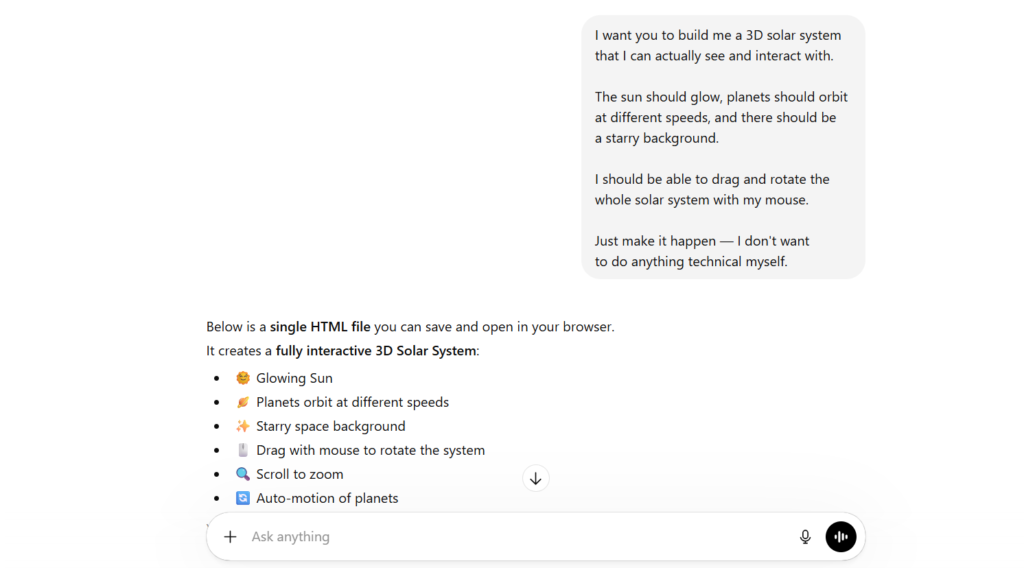
ChatGPT responded quickly. It told me it had built a ‘fully interactive 3D Solar System’ with a glowing sun, orbiting planets, starry space background, drag-to-rotate, scroll-to-zoom, and auto-motion of planets.
Sounds great, right? But here is the catch.
ChatGPT gave me a block of HTML code. Then it added a ‘How to Use’ section with three manual steps: copy the code, paste it into a file called solar-system.html, then double-click the file to open it in your browser.
I said ‘I don’t want to do anything technical myself.’ ChatGPT still gave me homework. To be fair — the instructions were clear, and ChatGPT even offered to upgrade the animation with NASA planet textures, Saturn rings, and moon orbits if I asked. But for a non-technical user, this approach puts the entire burden on you.
DeepSeek’s Response — The Doer
DeepSeek took 106 seconds before responding. That pause felt significant. It was actually thinking through the problem.
Then — with no instructions, no code blocks, no manual steps — a live, fully interactive 3D Solar System appeared directly inside the chat window on the right side of the screen.
The glowing sun was there. Planets were orbiting at different speeds. Saturn’s rings were visible. Stars filled the dark background. I could drag to rotate the entire system and scroll to zoom in and out. The entire system was created without copying any code, creating files, or opening a browser tab. It just worked — right there, inside the chat.
| 🏆 Verdict: DeepSeek understood what I actually wanted, not just what I literally said. ChatGPT completed the task technically. DeepSeek completed the experience. For non-technical users and beginners, this is a massive difference. |
To make this comparison as useful as possible for beginners, I ran both tools through four real-world test categories:
• Writing — Blog posts, emails, product descriptions
• Coding — Python debugging, building small scripts
• Research & Reasoning — Complex questions, multi-step logic
• Speed — Response time under normal load
I used DeepSeek on chat.deepseek.com and ChatGPT on chat.openai.com with a Plus subscription (GPT-4o). Both tests were conducted in March 2026.
7. Writing Quality Comparison
Winner: ChatGPT (by a small margin)
Both tools write well. But ChatGPT consistently produces smoother, more natural-sounding prose — especially for marketing copy, storytelling, and creative writing. It understands tone and audience better out of the box.
DeepSeek’s writing is accurate and structured, but sometimes feels slightly mechanical, especially for casual or creative content. For technical writing, documentation, and formal reports, the gap narrows significantly.
8. Coding Ability Comparison
Winner: DeepSeek
This is where DeepSeek genuinely shines. In coding benchmarks and my own tests, DeepSeek-R2 consistently produces cleaner, more efficient code with better error handling than ChatGPT.
For developers and students learning to code, DeepSeek is arguably the best free tool available right now. In my Python scripting test, DeepSeek delivered working, well-commented code in one shot — while ChatGPT required a follow-up to fix an edge case.
9. Research & Reasoning
Winner: Tie (task-dependent)
DeepSeek-R1 and R2 models were specifically built for reasoning — solving complex math problems, multi-step logic, and scientific questions. On hard reasoning benchmarks, DeepSeek matches or beats GPT-4o.
However, ChatGPT’s integration with real-time web browsing makes it better for research tasks requiring up-to-date information.
• For pure logical reasoning and math: DeepSeek wins
• For current events and fact-checking: ChatGPT wins
10. Speed & Response Time
Winner: ChatGPT (more consistent)
ChatGPT’s infrastructure is mature and well-optimized. Response speeds were consistently fast throughout testing. DeepSeek has been subject to server overload periods — especially during user surges. While improved in 2026, occasional slowdowns still occur during peak hours.
11. Pricing: Which Is Cheaper?
| Plan | DeepSeek | ChatGPT |
| Free Tier | ✅ Full model access | ⚠️ Limited (GPT-4o mini only) |
| Paid Plan | ~$2–6/month (API) | $20/month (Plus) |
| API Pricing | Very affordable | More expensive |
DeepSeek is significantly cheaper — and its free plan is more generous. For developers building applications, DeepSeek’s API costs are a fraction of OpenAI’s.
12. Who Should Use DeepSeek?
• You’re a developer or programmer looking for a free, powerful coding assistant
• You’re a student working on math, logic problems, or STEM assignments
• You want a free ChatGPT alternative with no usage limits
• You’re building AI-powered apps on a tight budget using the API
• You want to experiment with open-weight models you can run locally
13. Who Should Stick With ChatGPT?
• You need image generation (DALL·E integration)
• You rely on voice mode for hands-free AI conversations
• You handle sensitive or confidential professional data
• You use plugins or GPT integrations (Zapier, Notion, etc.)
• You want the most polished, beginner-friendly experience
• You need consistent uptime for business-critical tasks
Final Verdict
| Use Case | Recommended Tool |
| Best free AI chatbot | DeepSeek |
| Best for coding | DeepSeek |
| Best for writing | ChatGPT |
| Best for privacy | ChatGPT |
| Best for images | ChatGPT |
| Best for math/logic | DeepSeek |
| Best for beginners overall | ChatGPT |
| Best value for developers | DeepSeek |
In 2026, you don’t have to pick just one. The smartest users are using both tools for different tasks. Start with ChatGPT to learn the ropes, then explore DeepSeek for coding, math, and API-powered projects.
14. Frequently Asked Questions
It depends on what you need. DeepSeek is better at math, coding, and logic tasks. ChatGPT is better at writing, images, and creative work. Neither one wins at everything — pick the one that fits your task.
ChatGPT can handle text, images, and voice all in one place. DeepSeek only works with text but is stronger at math and coding. ChatGPT costs $20/month for full features. DeepSeek is completely free.
Yes, 100% free. No subscription. No credit card. No hidden fees. You just go to the website and start using it. There are no limits that push you to pay for anything.
For casual use it is generally fine. But DeepSeek stores your data on servers in China. So avoid sharing personal details, passwords, business secrets, or any sensitive information with it.
ChatGPT replies faster for everyday questions. DeepSeek sometimes takes longer because it thinks through the problem step by step before answering. The extra thinking time usually means a more detailed answer.
For math and science — yes, DeepSeek is better. It shows every step of its working, which helps you understand how the answer was reached. For writing essays or history papers — ChatGPT writes better.
Both are good at coding. DeepSeek often gives multiple ways to solve a problem, which is great for experienced developers. ChatGPT explains the code more clearly, which is better for beginners who are just learning.
Yes. ChatGPT writes in a more natural, human-like way. It handles tone, storytelling, and creative writing much better. DeepSeek’s writing can feel a bit robotic and stiff in comparison.
DeepSeek. It scores around 90% accuracy on hard math tests, compared to ChatGPT’s 83%. More importantly, DeepSeek shows you every step it took to get the answer, which makes it much easier to learn from.
No. DeepSeek is text only — it cannot create images or understand photos you upload. ChatGPT can do both. If you need to work with images, ChatGPT is your only option between the two.
Because it performed as well as ChatGPT but cost almost nothing to build. OpenAI spent over $100 million training ChatGPT. DeepSeek built a model of similar quality for just around $5.5 million. That genuinely surprised everyone in the tech industry.
Not nationally. But several US government agencies and some states have blocked it on official devices due to data privacy concerns. For personal use it is still available, but many experts advise caution with sensitive information.
DeepSeek if you want something free with no setup. ChatGPT if you want a more polished experience with more features. Both are easy to use, but ChatGPT feels more guided and beginner-friendly overall.
ChatGPT. It connects with tools you already use, can generate images, has voice mode, and remembers your preferences. For running a business day to day, ChatGPT’s extra features make a real difference.
Yes, but it requires technical setup. You can download DeepSeek’s open source model and run it on your own computer or server. This way your data never leaves your machine. It takes some effort but gives you full privacy and control.
Probably not fully. DeepSeek keeps growing in technical areas where cost matters. But ChatGPT has a much bigger feature set, a stronger ecosystem, and is trusted by businesses worldwide. Most likely, both tools will keep existing side by side — each doing what it does best.